
Tool Binding and Runtime Control in AI Coding Agents
Agent harnesses are the operational layer around a model that gives a coding agent tools, safety limits, memory, feedback loops, and execution control. In practice, the harness often determines whether an agent can complete real work, verify its output, and stay within safe boundaries.
Agent harnesses are the operational layer around a model that gives a coding agent tools, safety limits, memory, feedback loops, and execution control. In practice, the harness often determines whether an agent can complete real work, verify its output, and stay within safe boundaries. That matters if you want reliable agents without depending entirely on the latest proprietary model. A stronger harness can make smaller or local models more useful by improving how they read files, run tests, ask for approval, and recover from mistakes. For teams building agent-first workflows, platforms like Levr make that control plane explicit instead of burying it inside prompts.
At a Glance
Model quality matters, but harness design often decides whether an agent is actually useful.
- Core idea: An agent is not just a model. It is a model plus the surrounding execution system.
- Why it matters: Better harnesses can significantly improve results, especially for weaker models.
- Key components: Tools, safety controls, constrained autonomy, feedback loops, sub-agents, and optimization.
- Main tradeoff: More capability without guardrails creates risk. More guardrails without autonomy creates friction.
- Practical outcome: Teams can reduce dependence on frontier proprietary models by improving the harness around smaller or local models.
What is an agent harness, really?
An agent harness is the system around the model that lets it act. It includes tools, permissions, prompts, control flow, safety boundaries, and verification steps. If the model is the reasoning engine, the harness is everything that turns that reasoning into safe, testable work.
This definition matters because many discussions about coding agents flatten everything into model quality. That misses the practical reality of software work. A model that cannot read a repository, edit the right file, run tests, interpret failure output, and retry safely is not much help, even if its raw reasoning is strong.
A useful harness typically answers questions like these:
- What can the agent access?
- What actions can it take?
- When does it need approval?
- How does it verify success?
- How does it recover from failure?
That is why harness design is not a side detail. It is a primary part of agent capability.
Why can the harness matter more than the model?
The harness can matter more because it changes whether the model can complete the task end to end. A better harness improves access, safety, iteration, and validation. In many real workflows, those factors create bigger gains than swapping one capable model for another.
The key claim is not that models do not matter. They do. The claim is that model quality is only one variable in agent performance.
One benchmark highlighted in this discussion, HarnessBench, compares different harnesses across the same tasks and models. The reported spread is substantial, with results ranging from 52.4 percent to 76.2 percent based on harness differences alone. That is a large swing without changing the underlying model.
This pattern is especially important for weaker models. If a harness can compensate for model limitations, teams gain more freedom. They can explore local or open-source models instead of assuming the only path to useful agents is paying for the most advanced hosted systems.
This is also consistent with a broader industry shift. As AI-assisted development becomes common, engineering value increasingly comes from workflow design and verification, not just text generation. GitHub’s Octoverse reports show how widely AI is now embedded in developer workflows, while the Stack Overflow Developer Survey 2024 shows that developers use AI tools heavily but still question their reliability and correctness. A stronger harness directly addresses that trust gap.
How do you start building a useful harness from zero?
You start by giving the model the minimum structure needed to act on the task. The first harness is usually simple: a prompt, a task, and maybe one or two tools. That baseline reveals what the model can and cannot do without support.
A bare model can often explain what should be done. It usually cannot do the work itself unless the harness gives it access to the environment. For a coding task, that means at least being able to inspect code and write changes.
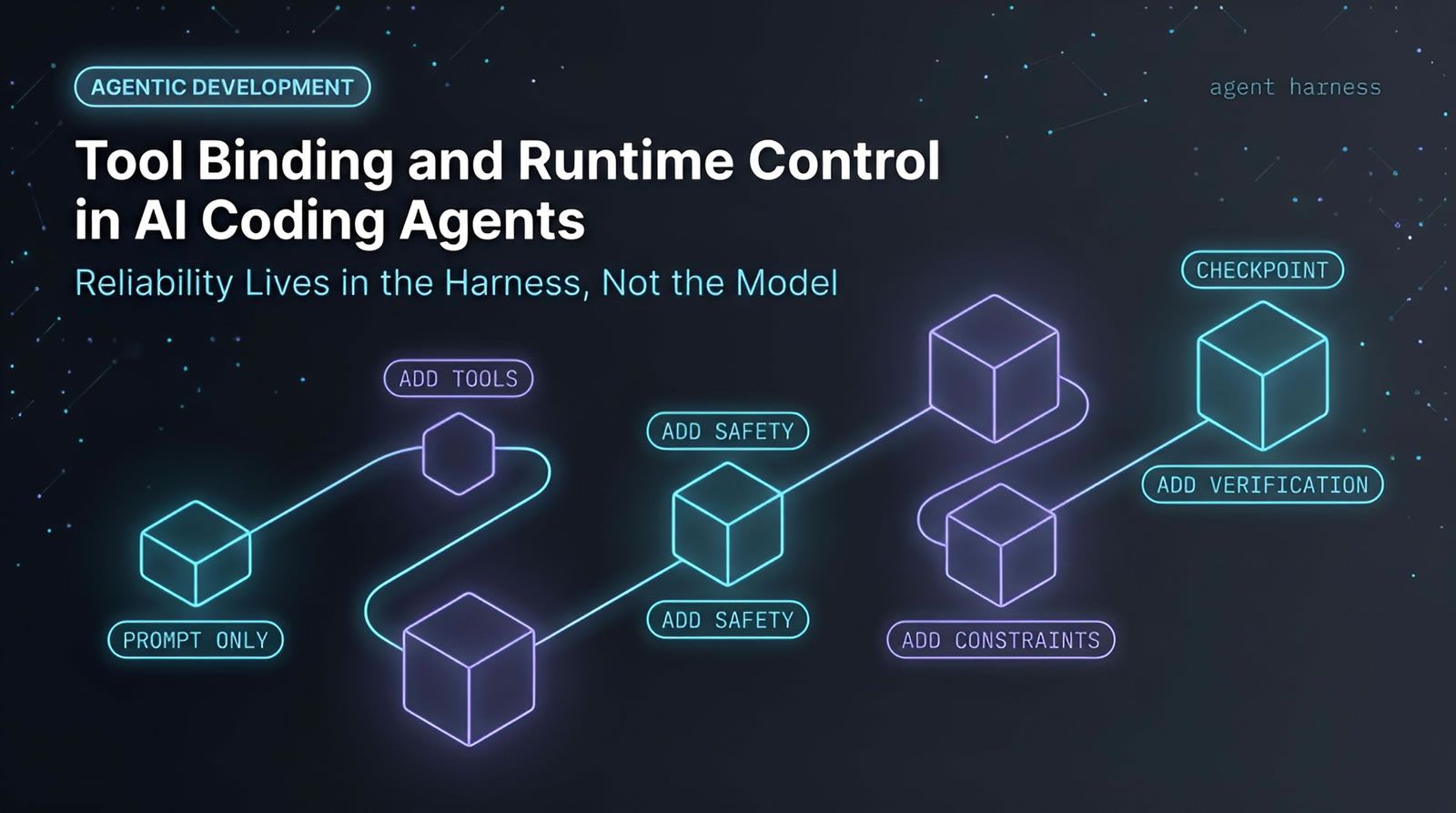
A simple progression looks like this:
- Prompt only: The model can reason, but it cannot inspect or modify files.
- Add tools: The model can read and write, but access may be too broad.
- Add safety: The model can act within approval boundaries.
- Add constraints: The model gets autonomy inside a limited workspace.
- Add verification: The model can run tests and respond to failures.
The point is not to jump to a complex multi-agent setup on day one. The point is to identify the first blocking constraint and fix it with the harness.
Why are tools the first big unlock for coding agents?
Tools are the first real unlock because they turn the model from a text generator into an acting system. Without tools, a coding agent can suggest fixes. With tools, it can inspect files, change code, and run commands.
This is the line between advice and execution. For example, if an agent is asked to fix a bug in a median function, it needs to do more than describe the bug. It must inspect the source file, check the failing test, edit the implementation, and confirm the fix.
Useful tool categories for coding agents include:
- Read tools: open files, inspect tests, search code.
- Write tools: update implementation files or tests.
- Execution tools: run test commands or linters.
- Lookup tools: search documentation or other sources.
But tools create a second problem immediately. Once an agent can act, you must decide what it is allowed to act on.
How do you make agent tools safe without killing speed?
Safe agent design depends on limiting capability at the tool layer, not just trusting the prompt. The practical goal is to let the agent operate autonomously in a narrow space while requiring approval for risky or sensitive actions.
A common early safety pattern is human approval. Before a tool reads sensitive data or writes to the file system, the system pauses and asks for confirmation. That works, but it is slow. If the agent needs approval for every step, you lose much of the benefit of automation.
The better pattern is constrained autonomy. Instead of allowing arbitrary file access, restrict the tool itself. For example, a read or write tool can be locked to a specific project directory. The agent can then act freely inside that scope, without needing permission for each operation.
This is a practical example of least privilege. Give the agent enough access to finish the task, but no more.
Teams building this kind of workflow at scale usually need the same idea at the project layer. One way to handle it is through an agent-first control plane such as Levr’s shared project and test context, where issues, tests, and agent actions live inside a bounded workflow rather than a loose prompt chain.
What makes feedback loops so important for agent quality?
Feedback loops matter because they let the agent evaluate consequences and retry. Instead of making one guess and stopping, the agent can inspect the result of its action, detect failure, and choose the next step based on evidence.
This is the difference between one-shot generation and iterative problem solving. In a coding task, the loop often looks like this:
- Reason: inspect the code and tests.
- Act: change the implementation.
- Observe: run the test suite.
- Decide: if tests fail, inspect the error and try again.
This pattern is often called ReAct, short for reason and act. It is widely used because it matches how debugging actually works. You do not just produce a final answer. You probe the environment, gather evidence, revise, and verify.
For engineering teams, this is also where control-plane thinking becomes useful. A workflow like define intent, let agents pick up tasks, run automated verification, then require human review maps closely to how robust harnesses already operate.
Make agent work observable before it becomes risky.
If your agents can edit code and run tests, you need a shared place to track tasks, verification, and approvals.
See how teams structure agent workflows
How do constrained autonomy and partial tool binding improve reliability?
Constrained autonomy improves reliability by narrowing the action space. When an agent only sees the parameters it is allowed to control, it makes fewer unsafe or irrelevant choices and can operate faster without human approval on every step.
A practical way to do this is partial tool binding, also known as partial function application. Instead of exposing a tool with every parameter open, you lock some arguments in advance.
For example, a read tool might normally accept a file name and a directory. If the harness binds the directory to a safe workspace, the agent only chooses the file name. It cannot wander outside that boundary because the harness never exposes that choice.
This gives you two benefits at once:
- Safety: the agent cannot access arbitrary locations.
- Simplicity: the tool interface is easier for the model to use correctly.
This is a strong example of why harness design matters. The model did not get smarter. The environment became better structured.
When should you use sub-agents instead of one larger agent?
Sub-agents are useful when the task spans different domains or tool sets. They reduce context bloat and make tool choice cleaner. Instead of one overloaded agent seeing everything, a top-level agent delegates to smaller agents with narrower responsibilities.
This matters because large tool menus and mixed contexts often confuse agents. If one agent has coding tools, research tools, planning tools, and review tools all in the same prompt, it has to pick among many unrelated options. That increases failure risk.
A better pattern is delegation. For example:
- Coding sub-agent: reads files, writes code, runs tests.
- Research sub-agent: searches a knowledge source and summarizes findings.
- Coordinator: decides which sub-agent to call and combines results.
This also maps naturally to systems built for multi-agent coordination. When teams need message passing, shared memory, or task routing between specialized agents, infrastructure like Levr is directly relevant because the problem is no longer just prompt quality. It is networked coordination.
What does self-optimization add that manual prompt tuning does not?
Self-optimization replaces guesswork with measurement. Instead of manually rewriting prompts and hoping for better results, you define what should improve, run evaluations, establish a baseline, and search for changes that move performance upward.
This is a major shift in agent engineering maturity. Early-stage harness work is usually exploratory. You add tools, try loops, tweak prompts, and watch what happens. That is useful, but it does not scale well.
Optimization changes the process:
- Mark what can vary: prompts, system instructions, or tool guidance
- Define the goal: fix the bug, pass tests, follow TDD, or minimize retries
- Measure the baseline: understand current performance
- Iterate systematically: keep what improves the objective
Once you reach this stage, the harness becomes an engineering surface, not just an intuition surface.
Why does language-level support make harness development easier?
Language-level support helps because agent systems need first-class control over tools, pauses, approvals, and resumable execution. When those features are bolted on from the outside, the code gets awkward fast and important patterns become harder to reason about.
The argument here is not that every team must invent a new language. The more practical takeaway is that harness features become much easier when the runtime treats them as native concepts.
Examples of useful language or runtime support include:
- Simple tool definitions.
- Interrupts for human approval.
- Pause and resume at the exact execution point.
- Nested interrupts inside tools, loops, or sub-agents.
- Serializable execution state.
- Built-in optimizers.
If a workflow can pause during a tool call, return control, then resume later at the same point, you can build approval-heavy or long-running systems without awkward state reconstruction. That is the kind of infrastructure difference that changes what is practical to build.
What mistakes do teams make when they over-focus on the model?
Teams that over-focus on the model often underinvest in structure, verification, and safety. The result is an agent that sounds capable but fails on execution, or an agent that can act but has too much unchecked access.
Common mistakes include:
- Assuming better reasoning removes the need for tools.
- Giving broad file-system or system access too early.
- Skipping test execution and feedback loops.
- Using one giant agent for unrelated tasks.
- Manually prompt-tuning without measurement.
- Treating safety as a final step instead of a design constraint.
There is also a strategic risk. If your agent quality depends entirely on the best proprietary model, your costs, privacy posture, and deployment options are all tied to outside vendors. A stronger harness gives you options.
How do you apply these ideas in a real engineering workflow?
The practical path is incremental. Start with a narrow task, add the smallest toolset that enables action, then layer in constraints, verification, and delegation only where they solve a real failure mode.
A good rollout sequence for a coding agent looks like this:
- Pick one bounded task: bug fixing, test repair, or refactoring in a limited repo area.
- Add read and write tools: only what the task needs.
- Constrain the workspace: lock access to a safe directory or project scope.
- Add a verification loop: run tests, inspect failures, retry.
- Introduce approval gates: require review before merging or expanding scope.
- Split roles when needed: move research, coding, or review into sub-agents.
- Measure performance: optimize against explicit goals.
For teams coordinating several coding agents at once, the harness eventually becomes a project management problem as much as a prompt problem. That is where agent-first systems become useful. One way to handle this in Levr is to define intent in natural language, let agents pick up scoped work, run automated verification, and keep human approval as the merge boundary.
Runtime Visibility Across Agent Tool Calls: The Levr Dashboard
When agents are bound to tools and interrupts, knowing what's running — and what's waiting on a human decision — matters as much as the binding logic itself. The Levr Dashboard aggregates active runs and pending interrupts into a single pane of glass.

The Levr Dashboard tracks agent tool calls and runtime interrupts alongside human-managed work
Technical Deep Dive FAQ
What is the difference between an agent and a harness?
A harness is the operational layer around the model, while an agent is often the full system that includes both the model and that harness. In practice, the harness covers tools, prompts, safety rules, loops, and execution behavior. When people say an agent is good or bad, they are often describing harness quality as much as model quality. That distinction matters because harness improvements are usually more accessible to engineering teams than model training itself.
Why is the harness especially important for weaker or local models?
Weaker or local models have less raw capability, so they benefit more from structure. A good harness narrows the task, provides the right tools, constrains choices, and creates feedback loops that help the model recover from errors. That means you can often get useful outcomes from smaller models if the execution environment is well designed. This is strategically important for teams that care about cost control, privacy, or running models locally.
What are the minimum features a coding agent harness should have?
At minimum, a coding agent harness should expose tools for reading relevant files, writing changes, and running tests. It should also include some form of safety control, such as approvals or scoped permissions, plus a verification loop so the agent can check whether its change worked. Without these basics, the agent is mostly limited to giving suggestions. With them, it can begin to function as a reliable debugging or implementation assistant.
How do human approvals fit into a modern agent workflow?
Human approvals work best as boundary controls, not step-by-step friction. Asking for permission on every file read or write quickly makes the system unusable. A better design is to approve categories of action or narrow workspaces in advance, then reserve human input for sensitive reads, destructive operations, or final review. In software delivery, a common pattern is to let the agent iterate freely inside a scoped task but require human approval before merge or release.
What is a feedback loop in a coding agent?
A feedback loop is the cycle where the agent takes an action, observes the result, and adjusts based on that result. In coding, this usually means reading code, making a change, running tests, inspecting failures, and trying again. This loop is critical because software tasks are rarely solved in one pass. The ability to observe consequences and adapt is what makes an agent feel closer to a real engineering system than a one-shot code generator.
When do sub-agents become worth the extra complexity?
Sub-agents become worthwhile when one agent starts carrying too many unrelated tools or contexts. That usually shows up as poor tool choice, bloated prompts, or fragile behavior across mixed tasks. Splitting responsibilities into specialized agents can improve reliability because each agent sees a cleaner toolset and a narrower role. The overhead is justified when delegation reduces confusion more than it increases orchestration cost, especially in research-plus-coding or planning-plus-execution workflows.
What does self-optimization actually optimize in an agent system?
Self-optimization usually targets configurable parts of the harness such as prompts, instructions, tool descriptions, or workflow settings. The system evaluates a baseline against a defined objective, then searches for changes that improve that objective. In a coding workflow, the goal might be fixing a bug, passing tests, or reducing failed attempts. The key benefit is methodological: instead of changing things by intuition alone, you create a repeatable process for improving agent performance.
Can better harnesses reduce dependence on proprietary models?
Yes, that is one of the strongest strategic arguments for harness engineering. If the harness can compensate for some model weakness through better tooling, tighter constraints, and stronger verification, then smaller or open-source models become more viable. That does not eliminate the value of advanced proprietary models, but it changes the tradeoff. Teams gain more portability, more control over deployment, and potentially better economics when model choice is not the only performance lever.
How does this relate to project management for coding agents?
Once several agents are working across tasks, the harness expands beyond single-run orchestration into project coordination. You need task state, test history, approval gates, and visibility into what each agent did. That is why agent execution and project control increasingly overlap. Agent-first platforms such as Levr address this by making issues, tests, and agent runs part of a shared control plane rather than leaving coordination inside isolated prompts or disconnected terminal sessions.
What should engineering managers measure when evaluating harness quality?
Useful measures include task completion rate, retry count, test pass rate, approval frequency, failure recovery behavior, and the amount of human intervention required per successful task. Engineering managers should also look at observability: can the team explain what the agent did, why it did it, and what evidence it used? Harness quality is not just output quality. It is also predictability, safety, and operational clarity across repeated runs.
Key Takeaways
Better agents are often built through better systems, not just better models.
The harness is where capability becomes reliable software work.
- Definition: The harness includes tools, constraints, loops, approvals, and execution control around the model.
- Performance: Harness quality can create large result differences even when the model stays the same.
- Safety: Constrained autonomy is better than either full access or nonstop manual approvals.
- Scalability: Sub-agents and optimization help when tasks and toolsets become more complex.
If you want agents that are cheaper, safer, and more portable, improve the harness before assuming the answer is a bigger model.
Further reading
- GitHub Octoverse
- Stack Overflow Developer Survey 2024
- AI security and the agent-ready web
- Levr agentic workflow
- Qinetic agent supernetwork
- Levr features
Ship at agent speed
Give your coding agents a control plane, not just a prompt.
Levr connects your coding agents, Claude Code, Cursor, Codex, and Copilot, to a shared project context with issues, gates, test suites, and memory. Free tier available. No credit card required.
Qinetic is included free with every Levr account, agent message bus, shared memory, and Q-Mesh MCP network at no extra cost.
No credit card required during beta.