
Designing AI Interfaces That Fight Automation Bias
Human-in-the-loop AI is not automatically safer just because a person approves the output. In many systems, humans gradually stop evaluating and start confirming, especially when the interface frames AI output as likely correct. That creates automation bias, weaker decisions, and ...
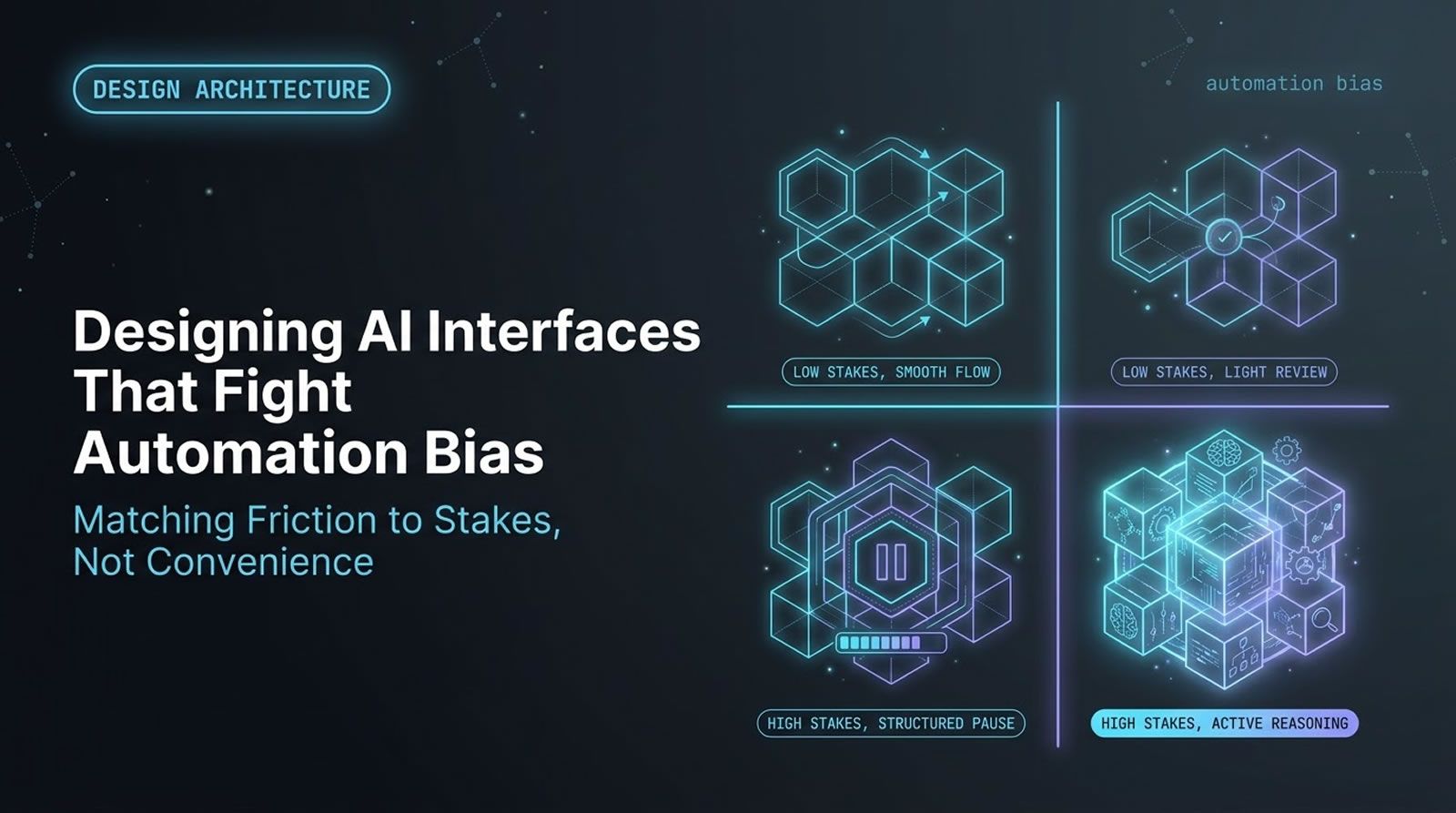
Human-in-the-loop AI is not automatically safer just because a person approves the output. In many systems, humans gradually stop evaluating and start confirming, especially when the interface frames AI output as likely correct. That creates automation bias, weaker decisions, and noisy training data. The real design goal is not more oversight. It is better interaction design that prompts independent judgment, captures meaningful disagreement, and turns user behavior into useful signals for improvement. For teams building agentic products, an agent-first control plane becomes valuable when it helps structure reviews, surface assumptions, and preserve decision context instead of reducing people to a final click.
At a Glance
Human oversight only works when the interface is designed to preserve judgment.
- Core problem: Human-in-the-loop systems often create rubber-stamping instead of real review.
- Main risk: Automation bias and cognitive surrender make people accept incorrect AI output with too little scrutiny.
- Better approach: Design workflows that require independent evidence, explicit trade-offs, and structured feedback.
- Data impact: Good interaction design produces cleaner labels, better evals, and faster model improvement.
- Developer relevance: The same pattern shows up in coding agents, copilots, review tools, and AI-assisted decision systems.
Why does human-in-the-loop AI fail so often in practice?
Human-in-the-loop AI fails when the human is present but not truly reasoning. If the interface implies the model is probably right, people often confirm its output rather than independently evaluating it. That turns oversight into approval theater, especially in fast, repetitive, or high-trust workflows.
On paper, the pattern sounds safe. A model generates an output, a human checks it, and a final decision gets made. In reality, that simple picture hides a critical assumption: that the human is still thinking critically.
That assumption often breaks down. People delegate cognition all the time. They trust maps, search summaries, recommendations, and autocomplete without revisiting the underlying reasoning. As AI moves deeper into daily software workflows, that same trust carries over into review tasks.
The result is a subtle shift. The person in the loop stops acting like an evaluator and starts acting like a confirmer.
What is cognitive surrender, and why does it matter for AI product design?
Cognitive surrender happens when someone adopts AI output with minimal deliberation. For product teams, that matters because the interface can either encourage scrutiny or suppress it. If your system trains users to defer, it weakens decisions and contaminates the data you collect for future improvement.
The underlying risk is not only that models can be wrong. It is that people may absorb wrong answers into their own reasoning process.
The video description cites a 2026 Wharton study by Shaw and Nave on how AI reshapes human reasoning. According to that description, participants accepted AI answers more than 80 percent of the time even when the answers were wrong. That is a strong warning sign for any workflow where humans are expected to act as safeguards.
This aligns with broader industry concerns about trust and correctness in AI-assisted work. The Stack Overflow Developer Survey 2024 shows strong adoption of AI tools among developers, while also reporting concerns around accuracy and reliability. High usage plus uneven trust calibration is exactly the combination that makes poor interaction design dangerous.
What did the Duolingo English Test case reveal about automation bias?
The case showed that skilled reviewers can still defer to bad AI signals when the workflow nudges them toward confirmation. Even experienced people performed at near coin-flip levels when fabricated alerts were inserted into a normal review process, which strongly suggests automation bias rather than lack of expertise.
The context matters. The Duolingo English Test is a high-stakes English proficiency exam used by thousands of programs worldwide. Because the exam is online and remotely proctored, it relies on a mix of identity verification, a locked testing environment, AI-assisted monitoring, and final human review.
One AI signal in that system looks for copy typing, a form of cheating where someone transcribes existing text instead of composing original responses. The model examines typing anomalies and flags unusual sessions conservatively.
To test reviewer behavior, clearly legitimate historical sessions were presented as if they contained AI alerts for copy typing. The reviewers were highly trained, and the sessions had no impact on real test takers. Even so, half of the fabricated alerts were upheld. In a system with serious downstream consequences such as admissions or visa decisions, that rate is unacceptable.
Why was the interface, not the model or the people, the real problem?
The problem was the interaction design because both the model and the reviewers were already strong in their own domains. A misleading review frame caused people to over-trust an alert. The workflow shaped behavior, and behavior shaped the final decision quality.
This is the key insight. It is easy to blame the model when review outcomes go wrong. It is also easy to assume the reviewers need more training. But in this case, neither explanation fit cleanly.
The model’s false positive rate was low, and the inserted alerts were fabricated specifically for the experiment. The reviewers were experienced and calibrated above 90 percent on their accuracy metrics. The weak point sat between them.
That middle layer, the human-AI interaction loop, is where trust gets framed, evidence gets surfaced, and decisions get rushed or slowed down.
How can a small copy change improve AI review quality?
A small copy change can improve review quality by changing the human’s role from confirmer to judge. When instructions clearly state that the AI output is only a preliminary alert and that independent evidence is required, reviewers are more likely to think instead of defer.
That is exactly what happened in the case study. Guidance was updated to emphasize two points:
- The AI signal is preliminary: It is not the decision.
- Independent evidence is required: Reviewers must verify the behavior in the underlying footage before upholding the flag.
This simple framing shift increased rejection rates by 21 percent, moving outcomes closer to what the real production distribution should look like. No model retraining was required. No major interface overhaul was required. The review language itself changed the reasoning pattern.
That is a useful engineering lesson. Sometimes the fastest path to better AI system performance is not another model iteration. It is a sharper interaction contract.
Why should developers treat interaction design as part of the model system?
Interaction design is part of the model system because it determines how humans respond, what labels get logged, and which errors get reinforced. If people rubber-stamp outputs, your system records false agreement. If they truly evaluate, your system collects useful disagreement and better training signals.
AI systems are often described as a pipeline. Model output goes to a human, and the human makes a decision. But the more accurate mental model is a loop.
Model output shapes interaction. Interaction shapes human behavior. Human behavior creates data. That data feeds evals, analytics, and later versions of the model.
If the interaction layer is weak, the loop becomes self-poisoning. Confident model outputs trigger shallow review. Shallow review creates noisy positive labels. Noisy labels make the next model look better than it is. Over time, the system gets more persuasive, not necessarily more correct.
The opposite is also true. If the interface forces independent judgment and preserves edits, overrides, and disagreements, you get sharper labels and more honest signals. That creates a flywheel for model improvement.
How do bad review prompts create bad training data?
Bad review prompts collapse nuanced decisions into shallow yes-or-no responses. That loses context about whether the model’s perception was correct, whether the action was appropriate, and what the human actually changed. Once that nuance is lost, your training data becomes less reliable.
A useful example comes from a headphone detection workflow. A single prompt asked whether a detected object should trigger a flag. But there were actually two separate questions hidden inside it:
- Perception question: Did the model correctly detect something that looks like headphones or earbuds?
- Policy question: Should that detection count as a rule violation?
Those are not the same. A hearing aid may look similar to an earbud. The model may be visually correct while the policy outcome should still be no violation.
If the interface only captures one binary answer, teams are forced to choose between protecting the user and preserving model signal. That is bad system design. Splitting the decision produces cleaner labels and more useful data.
Turn review behavior into useful system data
Teams using agent-first workflows can structure plans, review gates, and decision history so human feedback becomes usable signal instead of a final approval click.
See how Levr structures agent workflows
What does good AI interaction design look like in writing tools and tutors?
Good AI interaction design makes feedback specific, local, and easy to act on. Instead of overwhelming users with a long rewrite or vague praise, the system should tie comments directly to the relevant text so people can improve one decision at a time.
This matters because large blocks of feedback often feel comprehensive while being hard to use. An AI tutor that rewrites a short paragraph into hundreds of lines of advice may sound smart, but it makes learning harder. It overloads attention and weakens the connection between issue and fix.
A better pattern is inline markup. Show what is strong, awkward, or incorrect directly in the original text. Make the feedback concise. Attach it to the exact phrase or sentence. Let the user accept or reject the suggestion in context.
That approach does two things well. It feels closer to natural human review, and it produces structured feedback events that can later improve the system.
How do the same problems show up in coding agents?
The same problems appear in coding agents when developers are pushed into either approving giant diffs or clicking through endless micro-prompts. Both patterns reduce real judgment. One hides too much behind a large change set, and the other turns review into repetitive confirmation.
Many agent workflows fail in one of two ways.
- Big-bang execution: The agent disappears, modifies many files, and returns with a large patch that is hard to inspect meaningfully.
- Notification spam: The agent asks for approval at every tiny step, which trains the developer to keep clicking yes.
Neither pattern is ideal. In both cases, the human becomes a rubber stamp. Real debugging and reasoning happen later, after the system has already committed to a path.
A better model is a junior developer relationship. A strong junior teammate does not vanish for a day and return with a thousand-line pull request. Nor do they interrupt every five minutes. They plan, ask useful questions, document assumptions, and break work into reviewable chunks.
That same pattern is what coding agents should emulate.
How do you design a coding agent for discernment instead of approval?
A coding agent designed for discernment should surface assumptions early, present plans before execution, and break implementation into meaningful reviewable steps. The goal is to keep the developer in control of decisions without forcing constant interruption or hiding too much work at once.
Practical design patterns include:
- Plan first: Show the task breakdown, affected components, and expected trade-offs before editing code.
- Expose assumptions: Ask for confirmation on ambiguous requirements, architecture choices, or edge cases early.
- Chunk changes: Group code updates into coherent review units instead of one giant diff.
- Capture overrides: Log where the developer changed, rewrote, or rejected the agent’s approach.
- Preserve rationale: Keep reasoning attached to commits, issues, or task steps so later review has context.
For teams using coding agents at scale, this is where a shared control plane matters. One way to handle this in Levr’s agentic workflow is to define intent in natural language, let agents pick up scoped tasks, run automated verification, and keep human review attached to specs, tests, and issue context rather than a raw final diff alone.
This also matches what industry adoption trends suggest. GitHub’s Octoverse reporting has highlighted how quickly AI-assisted software development has moved into the mainstream. As usage rises, review quality and decision structure matter more, not less.
What design principles help humans think instead of defer?
Strong AI interfaces prompt reasoning by clarifying the human’s role, matching friction to risk, and capturing decisions with enough structure to learn from them. The goal is not maximum convenience at every step. It is the right amount of effort at the right moment.
Several principles stand out.
Engineer the reasoning pattern
Do not ask whether an output “looks good” if what you really need is investigation. Frame the human as the decision-maker, not the final checkbox. Ask for corroboration, trade-off selection, or assumption validation.
Match friction to stakes
High-stakes systems need deliberate slowdown. Low-stakes systems may need smoothness. Friction is not always bad. In important decisions, it helps preserve attention and judgment.
Assume every interaction is a label
Approvals, edits, overrides, follow-up questions, and clarification requests all say something about model quality. If your system only records thumbs up or thumbs down, you are throwing away signal.
Design for data before you ask for evals
Do not build the whole product and then ask how to measure it. Start with the definition of success, the metrics you need, and the interaction signals that can support future training and evaluation.
Use structured inputs and outputs
Tables, forms, inline markup, segmented plans, and explicit review fields reduce ambiguity. They also make downstream analysis far easier than giant unstructured text blobs.
How do you capture better labels from agent workflows?
Better labels come from preserving the difference between what the model proposed and what the human actually accepted, changed, or rejected. Without that diff, systems overestimate success and miss the exact places where human judgment corrected the model.
For developer tools, useful signals often include:
- Approved plan items: Which proposed steps were accepted unchanged?
- Modified assumptions: Where did the developer revise intent or scope?
- Overridden implementations: Which code paths were replaced manually?
- Trade-off selections: Which performance, readability, or architecture choices were preferred?
- Clarification events: Where did the human ask follow-up questions?
Platforms built for human-agent collaboration can make this much easier. In Levr’s shared control plane, teams can keep issue state, tests, and review history in one place. That does not magically solve judgment quality, but it gives teams a better place to capture the context around approvals, edits, and verification gates. When multi-agent coordination becomes part of the workflow, Levr adds shared memory, routing, and agent-to-agent messaging that can preserve more context across runs.
Keeping Humans in the Loop: The Levr Dashboard
Fighting automation bias starts with giving people something real to review, not just a rubber-stamp button. The Levr Dashboard surfaces agent runs, pending approvals, and recent decisions in one place — so reviewers see actual context, not just a checkbox

The Levr Dashboard gives reviewers real context on agent decisions, supporting genuine oversight rather than automatic approval.
What mistakes should teams avoid when building human-AI review systems?
Teams should avoid interfaces that imply the AI is already correct, force binary decisions where nuance matters, or hide the human’s actual edits. These mistakes train people to defer, reduce signal quality, and make future model improvements harder than they need to be.
- Using confirmation language: Prompts like “verify this flag” often bias the reviewer toward agreement.
- Collapsing multiple decisions into one CTA: Detection and policy decisions should often be separate.
- Collecting only final approval: A yes click without the edit history is weak supervision.
- Adding friction everywhere: Too much slowdown in low-stakes flows hurts usability without improving judgment.
- Removing friction in high-stakes flows: This is where speed becomes the enemy of discernment.
- Assuming expert users are immune: Skilled reviewers are still vulnerable to automation bias.
How do you give coding agents a real project control plane?
A real control plane gives coding agents context, task boundaries, verification gates, and observable handoffs. Instead of treating the agent as a black-box code generator, you make planning, implementation, testing, and review explicit parts of the workflow.
One practical pattern looks like this:
- Define intent: Create the task, constraints, and acceptance criteria in natural language.
- Surface the plan: Require the agent to break work into steps, assumptions, and proposed file changes.
- Review before drift: Approve or revise assumptions before large implementation begins.
- Run verification: Attach test suites and validation steps to the work, not as an afterthought.
- Preserve decisions: Keep approvals, overrides, and rationale tied to issues and outputs.
- Measure behavior: Track where agents needed correction so future runs can improve.
This is the kind of structure agent-first tools aim to provide. In Levr, projects, issues, test suites, and human review all sit inside the same workflow, which is more useful than scattering context across prompts, chat logs, and external tickets. For teams experimenting with Claude Code, Cursor, Codex, and Copilot together, that shared context becomes even more important.
Technical Deep Dive FAQ
What is human-in-the-loop AI?
Human-in-the-loop AI is a system design pattern where a person participates in the operation, supervision, or final decision of an automated workflow. The point is usually to improve safety, accuracy, fairness, or judgment in places where a model alone may fail. The common mistake is assuming that human presence automatically creates quality. In practice, the interface and incentives determine whether the person is really evaluating the output or just approving it.
What is automation bias in AI systems?
Automation bias is the tendency for people to trust or defer to automated outputs more than they should, especially when the system appears confident or authoritative. In AI products, this often shows up when users treat suggestions, flags, or summaries as presumptively correct. The risk is not just isolated mistakes. Automation bias can change the whole review process, weaken human scrutiny, and create misleading feedback signals that later get treated as ground truth.
Why does a human approval step not guarantee safety?
A human approval step only helps if the person has both the context and the cognitive space to make an independent judgment. If the system presents the AI result as likely correct, compresses the decision into a quick click, or pressures the person for throughput, the approval becomes weak oversight. That means the human layer can fail silently. The system still looks safe on paper because a person approved it, but the real review quality may be much lower than expected.
How can interface copy influence AI review outcomes?
Interface copy shapes the reviewer’s mental model of their role. If the wording frames the AI output as a valid alert awaiting confirmation, reviewers may look for reasons to agree. If the wording emphasizes that the alert is preliminary and requires independent evidence, reviewers are more likely to investigate. Small language choices can therefore change both outcome quality and data quality. Copy is not cosmetic in human-AI systems. It is part of the decision architecture.
What kinds of feedback signals are most useful for improving coding agents?
Useful signals go beyond accepted or rejected. Strong agent feedback includes changed assumptions, selected trade-offs, rewritten code regions, skipped plan steps, added tests, and clarification requests. These events tell you where the model aligned with intent and where human judgment had to intervene. If all you store is a final merge or approval status, you miss the fine-grained evidence that would help improve planning, code generation, and review behavior in the next model or workflow iteration.
How should teams separate detection from policy decisions?
Detection and policy should be separated whenever the model’s observation and the desired action are not identical. A model might correctly detect an object, phrase, behavior, or pattern, while the final decision about whether it violates a rule still depends on context. Combining both decisions into one button creates bad labels. Separate fields let you preserve the model’s perception accuracy while still handling exceptions, edge cases, and human judgment correctly at the policy layer.
When should you add friction to an AI workflow?
Friction should be added when the cost of a wrong decision is high, when the workflow is vulnerable to automation bias, or when you need a durable record of reasoning. In those cases, review gates, structured prompts, and explicit confirmations can improve decision quality. Friction should be reduced in low-stakes, exploratory, or conversational flows where speed and flow matter more than strict auditability. The right choice depends on risk, not ideology.
What does a good review flow for coding agents look like?
A good review flow starts before code is written. The agent proposes a plan, highlights assumptions, and clarifies ambiguous requirements. Implementation is then broken into meaningful chunks, with automated verification attached to each stage where possible. Human review focuses on decisions and trade-offs, not just end-state diff scanning. The workflow should also preserve edits, overrides, and accepted reasoning so the team can improve future runs instead of repeating the same mistakes with more confidence.
How can engineering managers measure whether oversight is real or performative?
Engineering managers should look for evidence of independent review behavior, not just approval counts. Useful indicators include override rates, clarification frequency, diff rewrites after approval, rejected assumptions, test failures caught before merge, and time spent at key review gates. If nearly everything is approved instantly and later fixed downstream, the team likely has approval theater. Real oversight leaves a trace in the workflow, and that trace should be measurable over time.
How do agent-first platforms help preserve discernment?
Agent-first platforms help when they structure work around plans, issues, tests, review gates, and memory instead of isolated prompts. That makes it easier to inspect assumptions early, connect outputs to acceptance criteria, and keep human corrections attached to the original work. The benefit is not that the platform replaces judgment. It is that the system gives judgment somewhere to live. Without that structure, valuable human decisions often disappear into chat history or informal fixes.
Key Takeaways
Human oversight is only as strong as the interaction that shapes it.
Design AI workflows so people investigate, not just approve.
- Discernment beats presence: A person in the loop is not enough if the workflow trains them to defer.
- Interaction is infrastructure: Copy, prompts, review gates, and structure directly affect decision quality.
- Labels come from behavior: Approvals, edits, overrides, and questions are valuable training signals when captured well.
- Coding agents need structure: Plans, assumptions, chunked reviews, and verification matter more than raw generation speed.
The fastest way to improve an AI system is sometimes to redesign the human interaction loop around it.
Further reading
Stack Overflow Developer Survey 2024
AI security and the agent-ready web
Ship at agent speed
Give your coding agents a control plane, not just a prompt.
Levr connects your coding agents, Claude Code, Cursor, Codex, and Copilot, to a shared project context with issues, gates, test suites, and memory. Free tier available. No credit card required.
Levr includes agent message bus, shared memory, and cross-agent context at no extra cost.
No credit card required during beta.