
What Is an Agent Control Plane? (It's Not Orchestration)
An agent control plane sits above your AI agents and holds their work to the task: who does what, what counts as done, the rules, and the record.

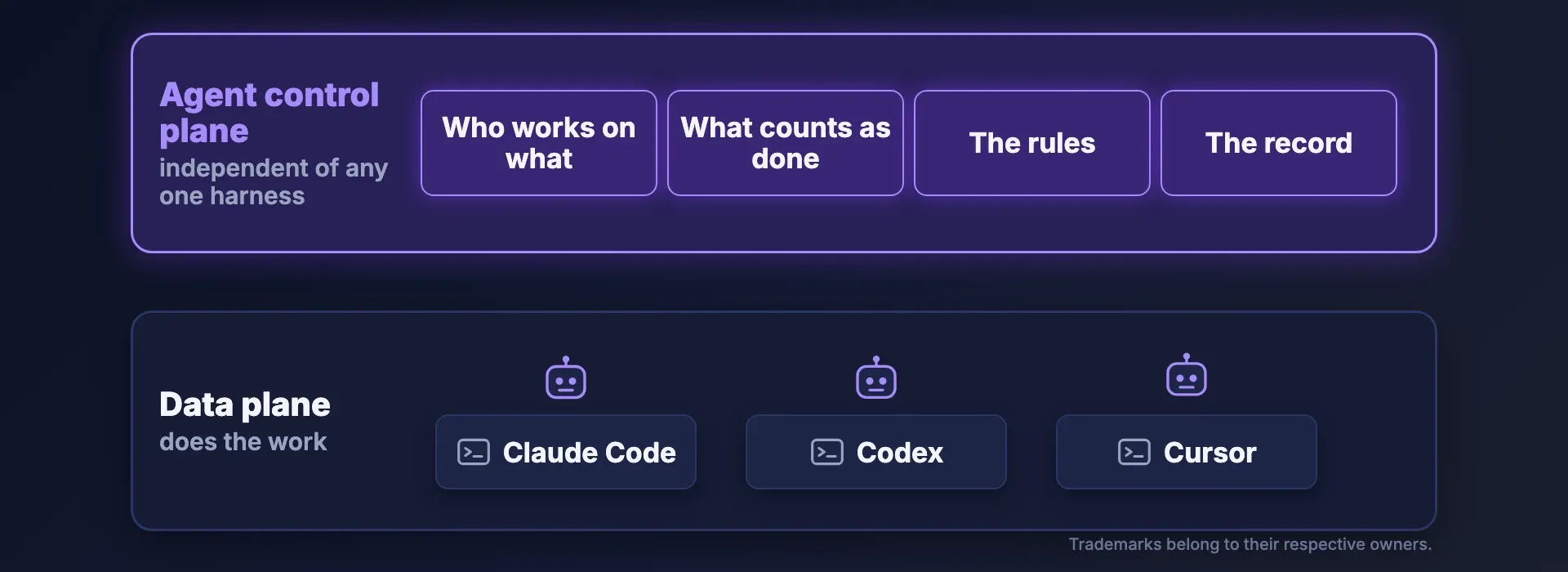
An agent control plane is the layer above your AI agents and their harnesses that decides who works on what, what counts as done, and which rules every agent follows, and keeps the record of what each agent did and decided. The agents and their coding harnesses (Claude Code, Codex, Cursor) are the data plane: they do the work. The control plane governs that work, independent of any one agent or vendor. An agent control plane is not agent orchestration. Orchestration runs the work: it routes tasks between agents and passes results along. The control plane is what holds that orchestration to the task.
The term is spreading. Microsoft calls Agent 365 "the control plane for AI agents". GitHub made an agent control plane generally available in February 2026, as governance features for GitHub Enterprise administrators. OpenHands introduced one in May 2026 to manage how agents operate across workflows, repositories and teams. And Forrester, the research firm, has announced an evaluation of the agent control plane market.
So is it just a new name for agent orchestration? No. Harness, orchestrator and control plane are three different jobs, and they're easy to mix up. This article explains each one.
Watch the video: https://youtu.be/jY93QzHZrzM
Where does the term come from? Control plane vs data plane
The term control plane comes from networking. In a router, the control plane is the part concerned with establishing the network topology: the routing table that decides where traffic should go. The data plane, also called the forwarding plane, moves the packets.
Kubernetes, the open-source system that runs containers across a cluster of machines, uses the same split. A Kubernetes cluster consists of a control plane and one or more worker nodes. The control plane manages the overall state of the cluster, and its scheduler assigns each Pod (a unit of running work) to a suitable node. On each node, a small agent called the kubelet makes sure the Pods are running.
In both cases the deciding part is kept apart from the doing part. That split is the whole idea.
What is an agent control plane?
AI agents use the same split. Your agents and their coding harnesses (the tools that run each agent's loop, such as Claude Code, Codex and Cursor) are the data plane: they do the work. IBM describes it the same way: each agent "operates in the 'data plane,' where it runs tasks and interacts with tools".
An agent control plane is the layer above the agents, independent of any one harness. Forrester's definition has it supervising different kinds of agents "in a vendor-agnostic way". For a team running coding agents, the control plane does four jobs:
- Who works on what. The control plane keeps one list of the work, with a holder on each task and its dependencies written down.
- What counts as done. The control plane decides when a task is finished, on evidence rather than on the agent's word.
- The rules. The control plane holds one set of rules that every agent follows.
- The record. The control plane keeps a record of what each agent did, what it decided, and what it was allowed to do.
Air traffic control is a useful picture. The planes fly themselves. The tower decides who goes where and under which rules, and it logs everything.
What is the difference between an agent control plane and agent orchestration?
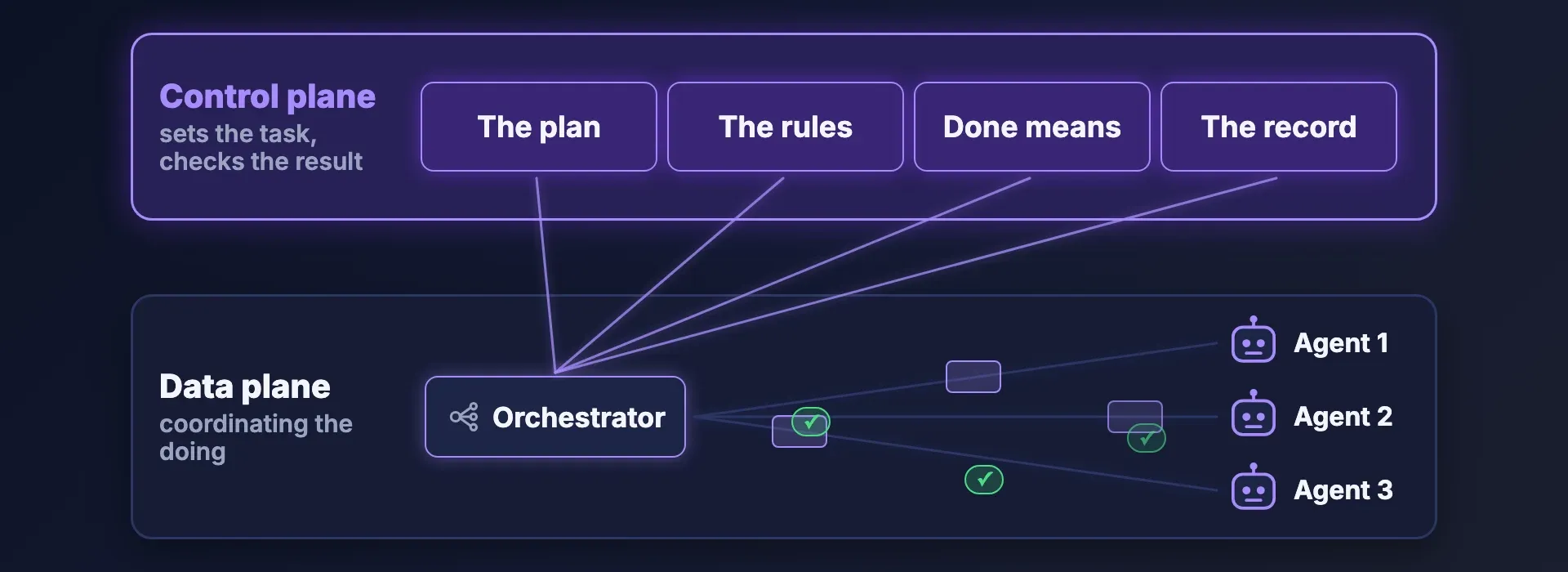
Agent orchestration runs the work. IBM defines AI agent orchestration as "the process of coordinating multiple specialized AI agents within a unified system." In practice, an agent orchestrator splits a job into tasks, routes each task to an agent and passes the results along. That's coordinating the doing, so the orchestrator sits in the data plane with the agents. Multi-agent orchestration is useful, and most teams will want it.
An agent control plane does a different job: it sets the task and checks the result. Forrester draws the same line. Its post separates a build plane, an orchestration plane and the agent control plane, says "governance must sit outside both planes," and says "oversight must live outside the agent's execution loop."
Some products bundle both jobs, and that's fine. They're still two jobs. Without the control plane, an orchestrator is fast, but nothing outside it checks that the work matched the task. So a control plane is not orchestration. It's what holds orchestration to the task.
- Its job: Agent orchestration: Splits a job into tasks, routes them to agents, passes results along; Agent control plane: Holds the plan, the rules and the definition of done, and checks the result
- Where it sits: Agent orchestration: In the data plane, with the agents; Agent control plane: Above the agents, outside any one agent's loop
- The question it answers: Agent orchestration: Which agent does this next?; Agent control plane: Did the work do what was asked?
- What it keeps: Agent orchestration: The flow of tasks and results; Agent control plane: The record of decisions, approvals and actions
Where the products sit
Agents and orchestrators do the work. Control planes sit above them. Microsoft Agent 365 is one, for managing and securing an organization's AI agents; Microsoft lists its capabilities as registry, access control, visualization, interoperability and security. Levr is one, for coding work: Levr is "the control plane for agentic development", one place for the plan, the issues and the tests that you and your agents both work from. The agents stay yours. Levr works with Claude Code, Cursor and Codex, whichever harness or orchestrator you run.
Do I need an agent control plane if my team uses more than one coding agent?
Yes. A control plane is worth having even with one developer and one agent. Left alone, an agent drifts from what you asked: it takes the shortest path to something that looks done. A control plane keeps the work true to the intent, decides when it's really done, and keeps the agent's decisions, so the lessons can become rules for the next run.
With more than one coding agent on different harnesses, it matters more. Nobody can watch every terminal, so the control plane sits outside any one harness and sees all of their work. People set the intent, say what counts as finished, and step in for the decisions that need them.
That's why a control plane is a key part of an AI software factory, where requirements go in and agents plan, build, test and ship the software while people set the direction. One way to picture the stack, from the bottom up:
- Models do the reasoning.
- Harnesses (Claude Code, Codex, Cursor) run each agent.
- Orchestration moves the work between agents.
- The control plane sits on top and checks that what comes off the line is what was asked for.
That stack is our framing, not a published standard. It lines up with Forrester's separate build, orchestration and control planes.
What breaks without an agent control plane: who works on what
Without a control plane, each of its four jobs breaks. The first is who works on what. Say three agents run in three terminals, each with its own task list. Nothing in one place says which agent holds which task, or what's waiting on what. Two agents pick up the same job, and a third starts before the work it depends on is done.
The fix: one shared list of the work, with a holder on every task and its dependencies written down. Tracker tickets help, but unless the tracker is wired into the agents' workflow, it drifts away from what the agents are actually doing.
What breaks: what counts as done, and the rules
When each harness checks its own work, it's grading its own homework. Agents aren't reliable judges of whether a task is done, because an agent tends to take the shortest path to something that looks done. The agent reports "all done", and the hard function turns out to be a stub.
The rules live per tool: a CLAUDE.md file for Claude Code, an AGENTS.md file ("a simple, open format for guiding coding agents"), and a .cursor/rules folder for Cursor. Each is a separate copy, and when the copies diverge, agents get different guidance. Even within one tool the rules aren't binding: Claude Code treats CLAUDE.md "as context, not enforced configuration".
The fix: one definition of done, written before the work and checked on evidence, and one set of rules for every agent. Code review helps, but it comes after the work has already been called done.
What breaks: the record
Agents make real decisions as they work: which approach to take, which library to use, what to skip. Those decisions scroll away in a chat window. A week later, it's hard to tell what an agent did, why it did it, or who signed off.
The fix: a record of each decision and its reasons, a person's approval where it matters, and every action traced to the agent that took it. Chat logs and commit messages help, but they're scattered across tools.
How Levr works as an agent control plane: who works on what
Levr is a control plane above your harnesses. Claude Code, Cursor, VS Code, Codex CLI and other AI agents connect to Levr over MCP, the Model Context Protocol. The agents work from the same plan, issues and tests you see in the Levr tracker.
For who works on what, Levr holds the work in one place: plans, and issues linked by blocks and blocked by. Before it starts, an agent claims an issue by assigning itself and moving it to In Progress, so you can see who holds each task.
How Levr decides what counts as done: gates and rules
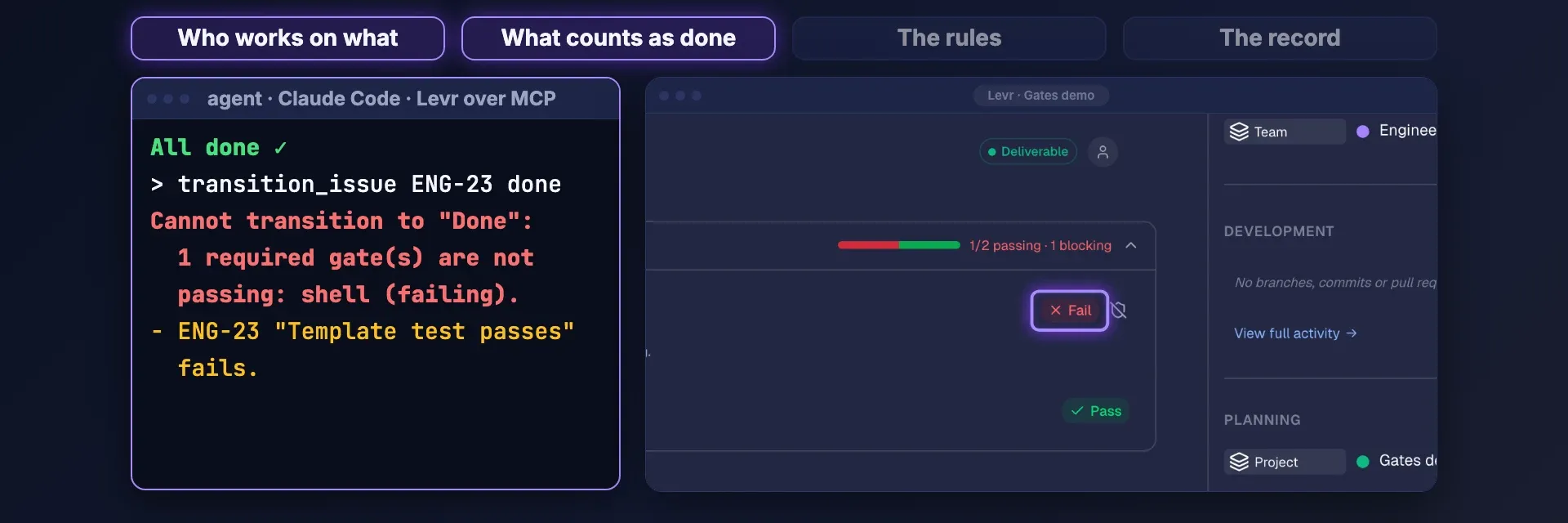
For what counts as done, Levr uses gates. A gate is "a check or a test attached to a task, written before the work starts." Required gates have to pass before the task can move to Done, no matter what the agent says. If a required gate fails, Levr refuses the move, and the refusal names what to fix. The verdict comes from evidence, not the agent's say-so.
For the rules, Levr lists the rules your agents follow in one place, under Settings → Rules, with filters for kind, scope, agent and autonomy.
How Levr keeps the record: the decision ledger
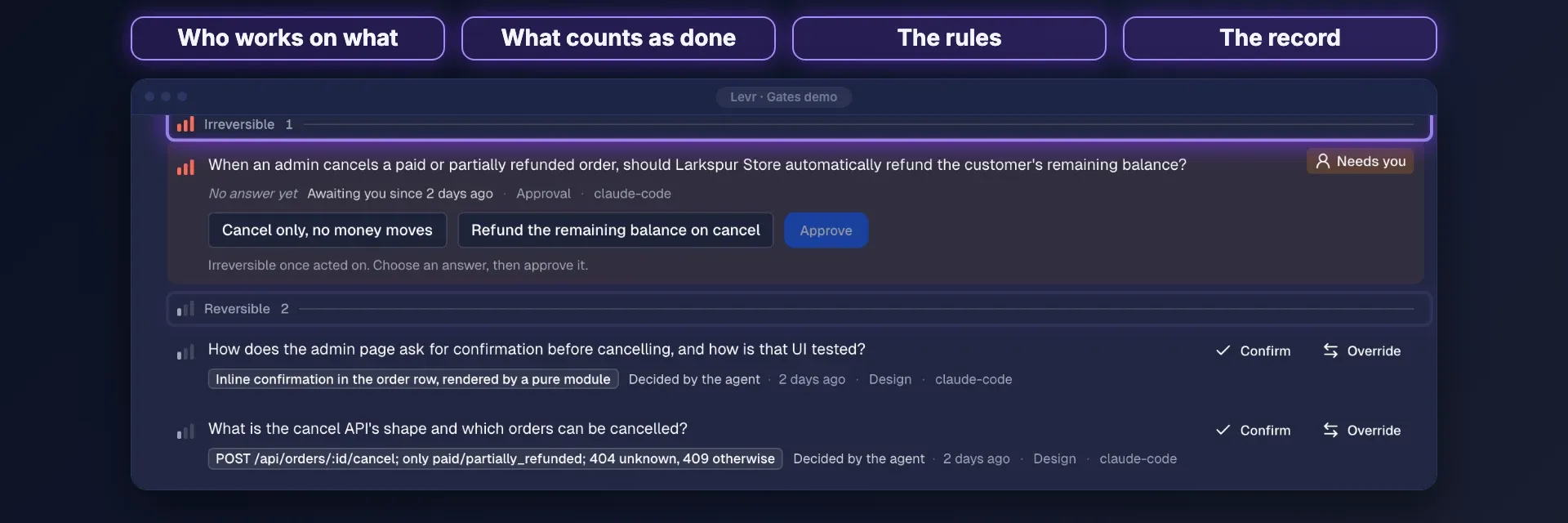
For the record, Levr has a decision ledger. Agents record each decision with its reasons, and each issue's Decisions section lists them, sorted by how hard each one is to undo. A person confirms or overrides a decision in one click, and approval requests wait for a person. A rule an agent proposes stays inactive until a person turns it on. Checkpoint history shows each agent run on the issue, with the questions the agent asked and the answers it got.
The short version
An agent control plane is the layer above your agents that holds their work to what you asked for, whichever agents and orchestrators do the work. It isn't orchestration; it's what holds orchestration to the task. Levr is that control plane for coding agents. Levr makes done mean proven.
Try Levr
Better models help. Better control planes help more. Try Levr free.